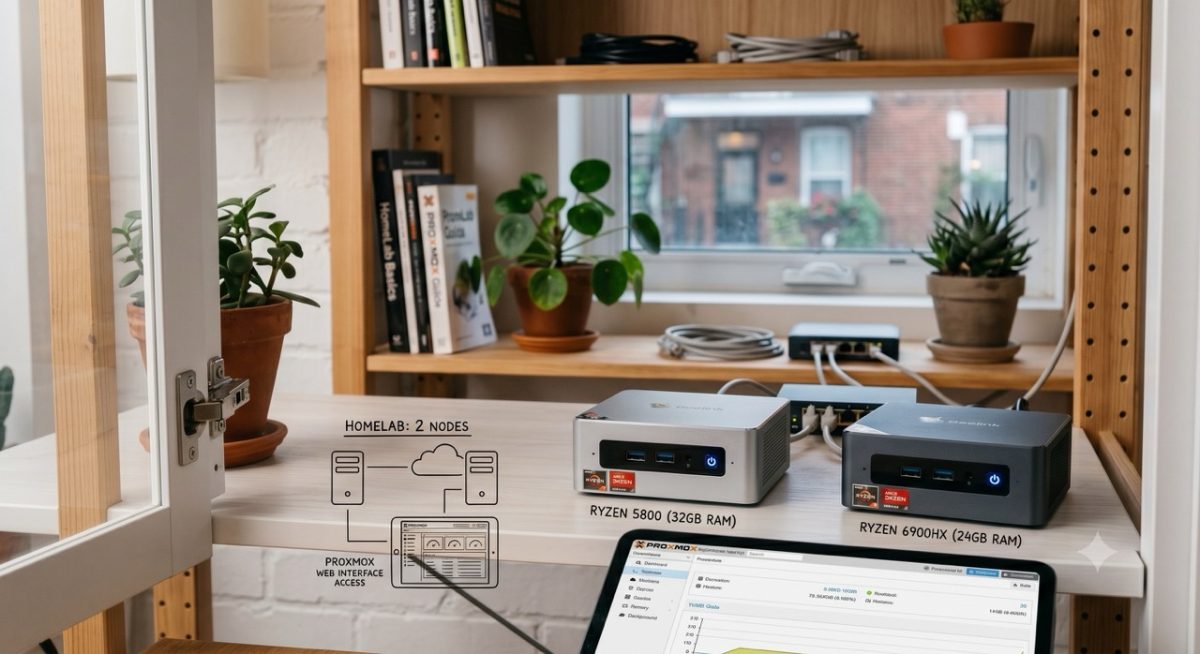
I have two servers running in my apartment right now. I could consolidate everything onto one. I haven't. Here's why — and why that might not be as strange as it sounds.
Small Computers, Big Capability
Both servers are mini PCs — compact, quiet, and efficient. One runs a Ryzen 5800 with 32GB of RAM. The other runs a Ryzen 6900HX with 24GB. Neither is a powerhouse. Neither needs to be.
If you've never seen a mini PC, think of something roughly the size of a Mac Mini. Companies like Beelink make them. They're small enough to tuck behind a monitor or, in my case, live quietly on a shelf inside an IKEA cabinet with room to spare. No keyboard, no mouse, no monitor attached. Just a power cable and a single Ethernet connection each. That's it.
Both run Proxmox as their operating system.
What Is Proxmox?
Proxmox is a free, open-source platform that turns a regular computer into a host for virtual machines and containers. Think of it as the control layer that lets one physical machine run multiple independent applications — each isolated, each manageable from a browser on any device on your network.
Installation is straightforward — faster than Windows, in my experience. Once it's running, you access everything through a web interface on your computer using the server's IP address. No remote desktop. No special client software. Just a browser.
If you're new to homelabbing or self-hosting, don't let the terminology slow you down:
- A virtual machine is essentially a full "virtual" computer running inside your computer.
- A container is lighter — a self-contained application environment that shares the host's resources more efficiently.
Both are ways of running services without cluttering your main machine.
So Why Two?
Honestly? I don't need two. I could run everything I currently have on either machine alone and still have headroom.
But here's what two gives me that one doesn't: flexibility without consequence.
When both servers are running, I can split workloads however makes sense that day. I can run the same container on both with different configurations to compare performance. I can designate one as stable and use the other to test something new — or mix everything together, which is actually what I do most of the time.
More practically: if one goes down, I don't lose everything. I run a solid backup system to a separate NAS, so I'm not dependent on live redundancy. But having a second node means I can pull containers over and keep things running while I troubleshoot. It's not high availability in the enterprise sense. It's just a reasonable safety net for a home setup.
The other thing is wear and tear. Running two servers splits the load and the hours across two machines instead of pushing one harder. That matters over the long run.
The Power Question
This is the one that surprises people most.
At idle, each server draws between 5 and 10 watts. At peak — both running simultaneously, actively doing things — I'm typically in the 50 to 60 watt range combined. The theoretical maximum for both is around 90 watts, but I've never seen it hit that.
To put that in context: a mid-range gaming PC idles at 100+ watts and can pull 500 watts or more at peak just from the GPU alone. I'm running two servers 24/7 at well under what a gaming rig draws playing a single game.
The cost to run both here in Montreal is negligible. Hydro-Québec rates are among the lowest in North America — so this isn't a meaningful line item in the household budget.
Is It Worth It?
That depends on what you're trying to do.
If you're just getting started with homelabbing: one server is completely sufficient. You can run a dozen containers on a single mid-range mini PC with 16GB of RAM and never hit a ceiling doing anything a home user or small business actually needs. If you have an old PC lying around un-used try it out. Even for beginners getting started with self-hosting is pretty easy and there is a great community of home-labbers out there willing to help.
If you're like me — you want the flexibility to experiment, you think in systems, and you've spent enough years in IT that running a clean, separated environment just feels right — two makes sense.
I've run the single-server setup before. It's simpler. But I keep coming back to two. At this point I'll call it what it is: part practical, part preference, and part the fact that I have the hardware and it's doing useful work.
That last part matters to me. I don't like idle equipment. Sure I could sell one of them but knowing myself I'd eventually find a reason to get a replacement, just because I like this setup more.
What's Actually Running on Them
My production workloads — Home Assistant, Uptime Kuma, Vaultwarden, Immich, Ollama — are spread across both nodes (a fanny way of saying systems) based on resource needs and what makes sense to keep stable versus what I'm actively tinkering with. Nothing is precious. Everything is backed up. If a container breaks, I delete it and reinstall. That's the whole point of this setup.
The Takeaway
You don't need two servers. But if you're curious about Proxmox, a single mini PC in the $150–$300 range is genuinely enough to get started. Low power, quiet, capable, and surprisingly fun to build out.
If you want to see exactly what I'm running — both the physical setup and a walkthrough of the Proxmox dashboard — I'm putting together a video version of this. Subscribe so you don't miss it.
Have questions about your own homelab setup? Drop them in the comments — I read everything.