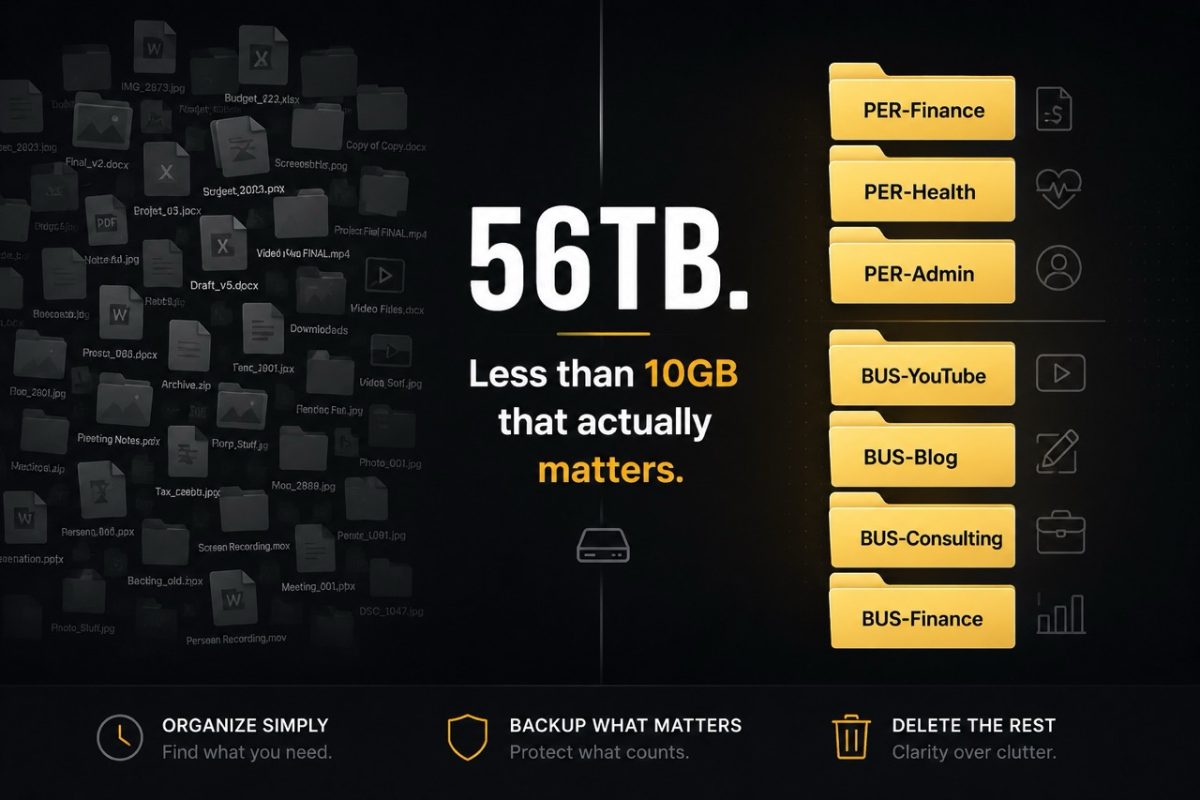
I Have 56TB of Storage. Here's the System I'd Use With Just 4TB.
Most people don't have a storage problem. They have an organization problem.
I currently run 56 terabytes of storage across three devices. But after years working in IT — and after experiencing data loss myself — I’ve learned something interesting.
When I strip everything down to the files I truly can’t afford to lose — taxes, medical records, financial documents, business records, and personal archives — it adds up to less than 10GB. Everything else is media, archives, and YouTube footage.
That gap is the point. The system matters more than the size.
The Three-Tier Setup
I organize everything across three tiers:
Everyday drive — active projects, current year files, anything I'm working on right now. I try to keep this drive as empty as possible. The less clutter it contains, the easier it is to find things and the more room I have when a large project comes along.
Fast NAS — recent archives, media, anything from the last one to two years that I'm not actively using but might need quickly.
Slow NAS — cold storage. Anything older than a year that I want to keep but will rarely touch. Old tax years, completed projects, media archives.
The rule is simple: if I haven't touched something in a year, it moves down a tier. If I haven't touched it in several years and it isn't critical, it gets deleted.
The Folder Structure That Actually Works
I've tried nested folders — Personal → Finance → 2024 → Taxes. It sounds logical until you're three levels deep at 11pm looking for one file. What works better for me is a flat, prefixed structure.
Every top-level folder gets a prefix:
PER- for personal (PER-Finance, PER-Health, PER-Admin)
BUS- for business (BUS-YouTube, BUS-Blog, BUS-Consulting)
That’s it.
One linear list.
About a dozen folders maximum. No hunting through nested subfolders — I see the prefix, I know exactly where the file belongs.
This structure also translates directly to my note-taking app. My Obsidian vault mirrors it exactly. One system, everywhere.
Backup What Matters
A lot of people hear “56TB” and assume I back up everything.
I don’t. Right now I have about 35TB free.
Backing up isn’t about protecting everything.
It’s about protecting the things you can’t afford to lose.
Critical documents, photos, business files, and completed work all exist in multiple places.
Temporary files, duplicate photos, downloads, and things that can easily be recreated don’t deserve the same level of protection.
Not every file is equally valuable.
Your backup strategy shouldn’t treat them that way. Refer back to my post about my backup strategy, for my take on it.
What You Actually Need to Keep
This is where most people go wrong — they keep everything because storage is cheap (was). It is the decisions that are hard.
Financial and tax records: Keep seven to eight years, zip and archive the rest by year. In Canada the CRA audit window is seven years — I keep eight to be safe. Anything older gets deleted unless it's tied to property or a major asset.
Photos: Keep the best shot. Not every variation. Not every almost-good picture. The best one.
Your future self will thank you.
YouTube footage: I keep the final export for the last five to ten videos in case I need to pull a clip. Raw footage from completed projects lives on the Slow NAS for one year, then it's gone.
Everything else: Run a Keep / Not Sure / Discard pass. Anything you’re unsure about goes into a holding folder. You review it at your next archive session. If you still don’t know why you’re keeping it during your next review, that’s probably your answer.
The 4TB Version of This System
The structure stays exactly the same. The rules simply become tighter.
I wouldn’t keep endless draft versions. I wouldn’t keep every piece of raw footage forever. I wouldn’t save files because I might need them someday. I’d keep them because I know I’ll need them.
With limited space, organization matters even more because you can’t afford clutter. The quarterly cleanup of my everyday drive takes about thirty minutes. The annual archive review takes about an hour.
That’s it.
Two maintenance sessions a year.
The Bottom Line
Storage is cheap. Searching through clutter isn't. Ironically, owning 56TB taught me that I don’t actually need 56TB.
Good storage isn’t about maximizing capacity. It’s about minimizing friction. You need a structure you can follow consistently, a clear rule about what earns a place on your drive, and the discipline to archive what's done and delete what's not needed.
Build it once. Maintain it twice a year. Stop thinking about it.