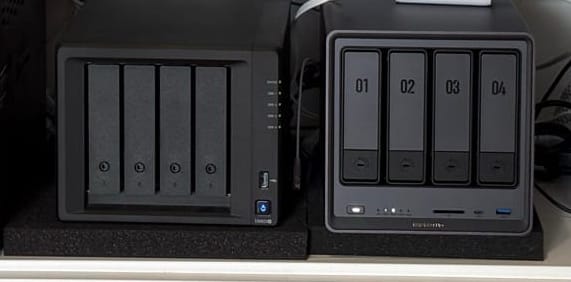
Welcome back to my minimalist homelab journey! Tucked away in a modest white cabinet within my 650 sq ft apartment, every piece of tech must earn its keep. Today, we're diving deep into a crucial 4-bay NAS comparison: the battle between the venerable Synology DS923+ and the powerful new contender, the Ugreen DXP4800 Pro. If you're looking to optimize your home server or network attached storage setup, this head-to-head review will help you decide which device best fits your needs and your philosophy for a truly minimalist digital life.
Synology DS923+ vs. Ugreen DXP4800 Pro: Key Specifications
Let's start by laying out the core hardware and software features of these two 4-bay NAS titans. This table highlights why both the Synology DS923+ and Ugreen DXP4800 Pro are strong contenders for your minimalist homelab.
| Feature | Synology DS923+ | Ugreen DXP4800 Pro |
|---|---|---|
| CPU | AMD Ryzen R1600 (2-core) | Intel Core i3-1315U (6-core) |
| RAM | 4GB DDR4 (ECC support) upgraded to 20GB | 8GB DDR5 upgraded to 20GB |
| Networking | Dual 1GbE (upgraded to 10GbE via $150 card) | 10GbE + 2.5GbE (Built-in) |
| Software | DSM (Mature, polished) | UGOS (Modern, maturing) |
| Build | Functional Plastic | Premium Aluminum Alloy |
The Case for Synology DS923+: The "Set It and Forget It" 4-Bay NAS
For the intentional minimalist, the Synology DS923+ isn't just a device; it's a commitment to reducing mental clutter in your home server setup. It’s often considered the best NAS for those who prioritize ease of use.
- Unrivaled Software Maturity (DSM): Synology’s DiskStation Manager (DSM) is often called the "iPhone of NAS" for a reason—it simply works. Its intuitive interface and robust features make complex network attached storage tasks feel effortless, offering a truly "set it and forget it" experience.
- Flexible Storage with Synology Hybrid RAID (SHR): A hallmark feature, Synology Hybrid RAID (SHR) offers unparalleled flexibility, letting you mix and match drive sizes. This is ideal for those who prefer to invest incrementally, expanding data storage as needed without the headache of a total system rebuild.
- Robust Ecosystem: Beyond basic data storage, Synology offers a comprehensive ecosystem. From Surveillance Station for home security to Active Backup for critical data, its integrated software suite is renowned for stability and seamless operation, making it a powerful home server solution.
The Trade-off: This seamless experience comes at a cost—a noticeable "software tax." The hardware, objectively dated for 2026, feels behind the curve, and the absence of built-in 10GbE is a significant missed opportunity, forcing an additional $150 upgrade for modern speeds.
My Synology DS923+ Use Case: In my minimalist homelab, the DS923+ serves as the primary repository for my media library (videos and music via Plex or Jellyfin—a battle for another day) and the archive for all my files. It's my largest data storage device, configured as a 40TB JBOD array. I've always preferred the simplicity of JBOD over RAID; if a drive fails, it fails, and I replace it, relying on robust backups for my truly critical data.
The Case for Ugreen DXP4800 Pro: The Power User’s Dream NAS
The Ugreen DXP4800 Pro caters to the power user seeking maximum "bang for their buck"—someone unafraid of a slightly steeper learning curve in exchange for raw performance. This newcomer aims to be the best NAS for hardware enthusiasts.
- Unmatched Raw Power: Boasting a 13th Gen Intel i3 and integrated 10GbE networking, this machine absolutely screams performance. It’s a hardware powerhouse ready for demanding workloads in your home server or minimalist homelab.
- Superior Performance: For demanding tasks like heavy video editing, running multiple virtual machines, or managing dozens of Docker containers, the Ugreen will effortlessly run circles around the Synology. Its powerful CPU and fast networking make it ideal for high-throughput data storage.
- Future-Proofing: With DDR5 memory and Gen4 NVMe slots, the Ugreen DXP4800 Pro is built for the future, offering blistering high-speed data transfers that ensure longevity and responsiveness for years to come.
The Trade-off: While its premium aluminum hardware is undeniable, the software (UGOS) is still playing catch-up, notably lacking Synology’s extensive app library and the same level of polish.
My Ugreen DXP4800 Pro Use Case: My DXP4800 Pro serves as the primary backup for all my files. Its 8TB of fast NVMe/SSD storage, combined with my 2.5GbE network, makes backups incredibly swift. (My main working storage is an 8TB DAS array directly connected to my M4 Mac mini). I also leverage the Ugreen for several Docker-based services. Hardware-wise, it's a truly impressive device. While UGOS is still "growing" and lacks some of DSM's mature features, it boasts a standout feature: an all-in-one mobile app. For a minimalist like me, having a single app for everything is far more appealing than Synology's approach of requiring a dedicated app for each service.
Choosing Your Ideal 4-Bay NAS: Synology vs. Ugreen for Your Minimalist Setup
Deciding between the Synology DS923+ and the Ugreen DXP4800 Pro for your minimalist homelab comes down to your priorities.
Choose the Synology DS923+ if...
- You seek network attached storage technology that seamlessly fades into the background.
- You prioritize rock-solid stability and a software experience free from weekend troubleshooting.
- You value a mature ecosystem for your home server with features like SHR and extensive app support.
- It's the intentional choice for a truly peaceful digital life, making it a strong contender for the best NAS for reliability.
Choose the Ugreen DXP4800 Pro if...
- Your homelab is a passion project, and you demand the absolute best hardware value.
- You need raw performance for demanding tasks like video editing, VMs, or numerous Docker containers.
- Blazing 10GbE speeds for massive file transfers and a sleek, premium metal chassis are non-negotiable.
- You're comfortable with a maturing software platform in exchange for cutting-edge hardware.
The Verdict: Synology DS923+ vs. Ugreen DXP4800 Pro for Your Minimalist Homelab
After 25 years in IT, a fundamental truth has emerged: hardware is "cheap," but your time is invaluable.
If your vision for a "minimalist" setup prioritizes spending less time managing home servers and more time living life, then Synology remains the undisputed king of user experience. However, if you're a tinkerer eager to push the boundaries of a compact apartment network and demand the latest hardware, the Ugreen DXP4800 Pro represents the most exciting innovation in NAS technology in a decade. It truly offers a compelling NAS comparison for performance.
Now, some might argue my setup is anything but minimal. And in some ways, they'd be right. Could I live without two separate 4-bay NAS devices? Absolutely. But would I want to, now that they're perfectly configured for my needs? Not a chance. For me, minimalism isn't about owning the absolute fewest items; it's about essentialism and intentionality. Every piece of hardware I own serves a distinct purpose and has earned its place in my minimalist homelab.
So, what's powering your own minimalist homelab or home server? Share your setup and experiences in the comments below!
/l/diagonal”### Minimalist Homelab Tip:
Before committing to a 4-bay NAS, conduct a thorough data audit. Do you genuinely need 40+TB of data storage, or are you simply hoarding "digital clutter"? Often, the most minimalist setup is the one you ultimately decide not to acquire.